
Trucking Super Calc: Cost Per Mile Calculator App for Owner Operators
Trucking Super Calc is a free Android app that works out your cost per mile, your break-even rate and the rate that pays you, using only the costs and miles you type in. Its Rate Check tab then grades a single load against those numbers.

The 3 Numbers: Cost Per Mile, Break-Even and Pay Yourself
Setup walks through 8 pages, from Your Miles to Road & Admin, and ends on a Summary page. A rate bar stays pinned at the top of the screen the whole way, so you can watch the 3 numbers move as you type each cost.
Cost Per Mile
Cost Per Mile is your total monthly cost divided by every mile the truck turns, loaded and empty. It is always per total mile. Your own pay is never counted as a cost, so it stays out of this number. If you want to work it out by hand, see how to calculate cost per mile.
Break-Even Rate
Break-Even is the floor, per loaded mile. It starts from Cost Per Mile. Then it accounts for the percentage fees that come off the top before the money reaches you: factoring, dispatch charged as a percentage of gross, and a hired driver paid a percentage of gross. Then it makes your paid miles carry your empty ones. A rate under Break-Even doesn’t cover the truck.
Pay Yourself
Pay Yourself is Break-Even plus the target pay you set on the Driver page. You can enter that pay per mile, per working day, per week or per month. The Pay Yourself rate appears once a target pay is set.
Loaded or total miles
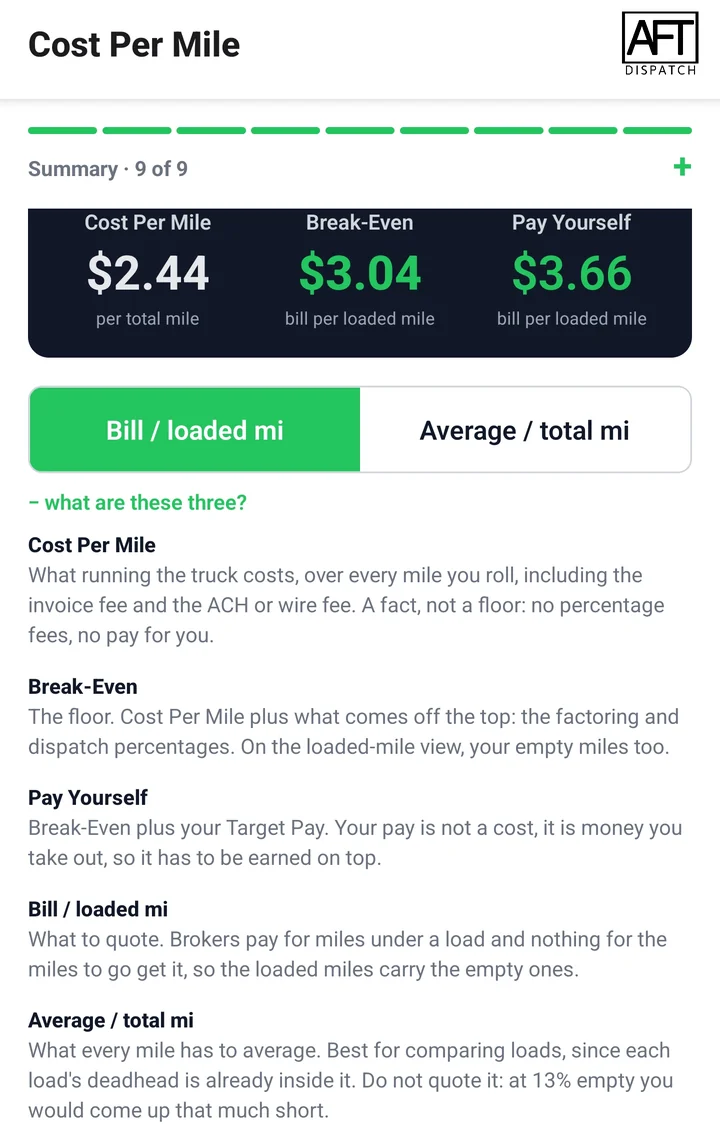
A single switch shows Break-Even and Pay Yourself 2 ways. “Bill / loaded mi” is the default, and it is the rate to quote a broker. “Average / total mi” is what every mile has to average. It works for comparing loads, but quoting it leaves you short by your empty-mile share.
The Summary page also has a step ladder that shows how the rates build up: running the truck, then factoring and dispatch off the top, then your empty miles, then paying yourself. On the total-mile view, the empty-miles step drops out.
The rest of the Summary page
- Your Numbers: everything you entered, rolled up per month into fixed costs, variable costs and total cost.
- Where Your Money Goes: every cost, largest first, with its share of the monthly total and its cost per mile. View it Grouped or line by line. The shares and per-mile figures add up exactly to the totals.
- Monthly P&L: enter the average rate you actually get, and it lays out your month: revenue, fixed costs, variable costs, factoring and dispatch, your pay, and what is left “To the business.”
Rate Check: Does This Load Pay?
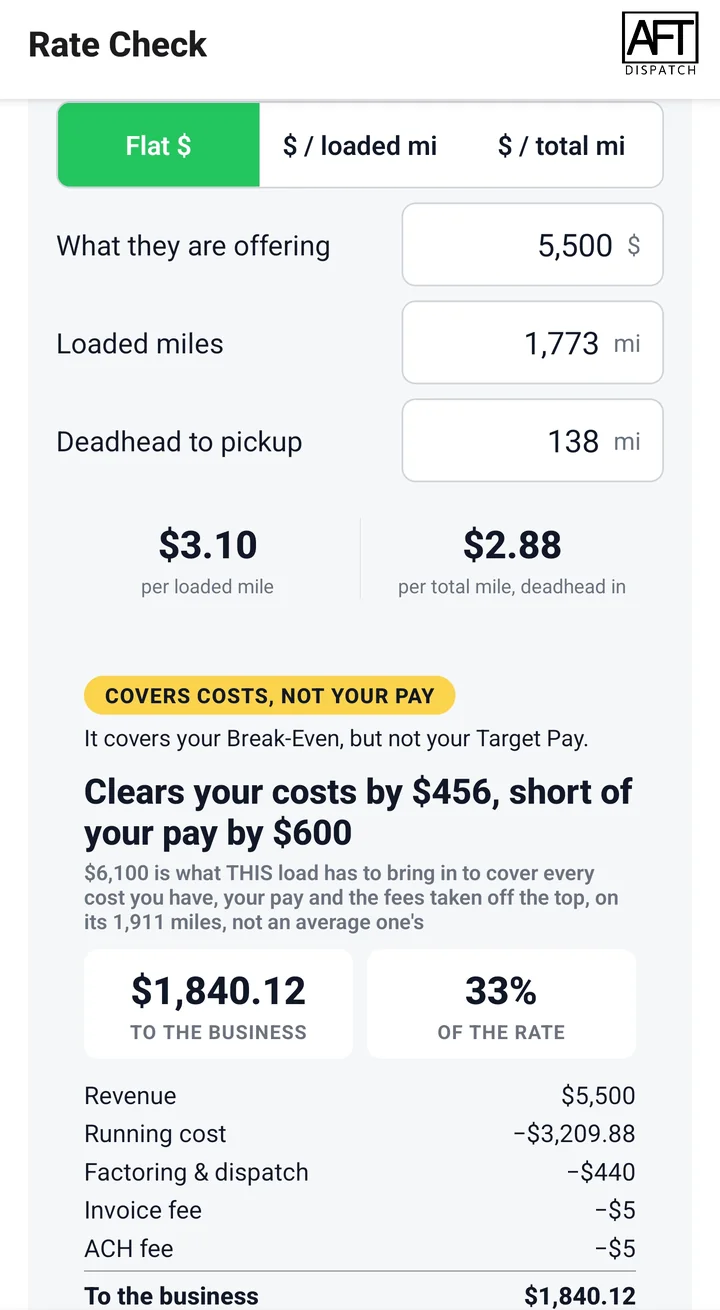
Enter the offer the way the broker gave it: a flat dollar figure for the whole load (the default), dollars per loaded mile, or dollars per total mile. Add the loaded miles and the deadhead to the pickup. Deadhead costs money and earns nothing, so it counts. The readout converts the offer into the other 2 forms, so all 3 are on screen at once.
The grade is measured only against your own numbers. The app has no market data to compare a load with. Each load is tested against its own Break-Even and its own Pay Yourself, worked out from that load’s own deadhead, so a load with less deadhead than your usual one needs less per loaded mile.
| Grade | What it means |
|---|---|
| Loses money | It doesn’t cover its running cost. |
| Below your floor | It covers its running cost but not your Break-Even. |
| Covers costs, not your pay | It covers your Break-Even but not your target pay. This grade only appears when a target pay is set. |
| Pays | It covers your Break-Even, and your target pay if you set one, with something left over. |
| Strong | It comes in more than 15% over what the load has to make. |
The grade card is red below Break-Even, amber for “Covers costs, not your pay,” and green when the load pays.
Under the grade, Rate Check shows what to ask for. The ask comes in all 3 forms: all-in dollars rounded up to the next $50, per loaded mile and per total mile. Next to it, the app shows how far short of the ask the offer is, or how far ahead.
A short table, “How this load compares, per loaded mile,” shows why this load’s rate differs from the one on your rate bar. It starts from your usual rate, adjusts it for this load’s deadhead and for the load’s own invoice fee and ACH or wire fee, and puts the offer beside the result.
A cash ledger shows what the load hands the business: revenue, minus running cost, minus factoring and dispatch, minus the invoice fee and the ACH or wire fee. It doesn’t charge a single load a slice of your monthly bills, like the truck payment and insurance. Those bills are already inside the load’s Break-Even, so a load that clears it has carried its share.
A Mile Estimate Held to Hours of Service
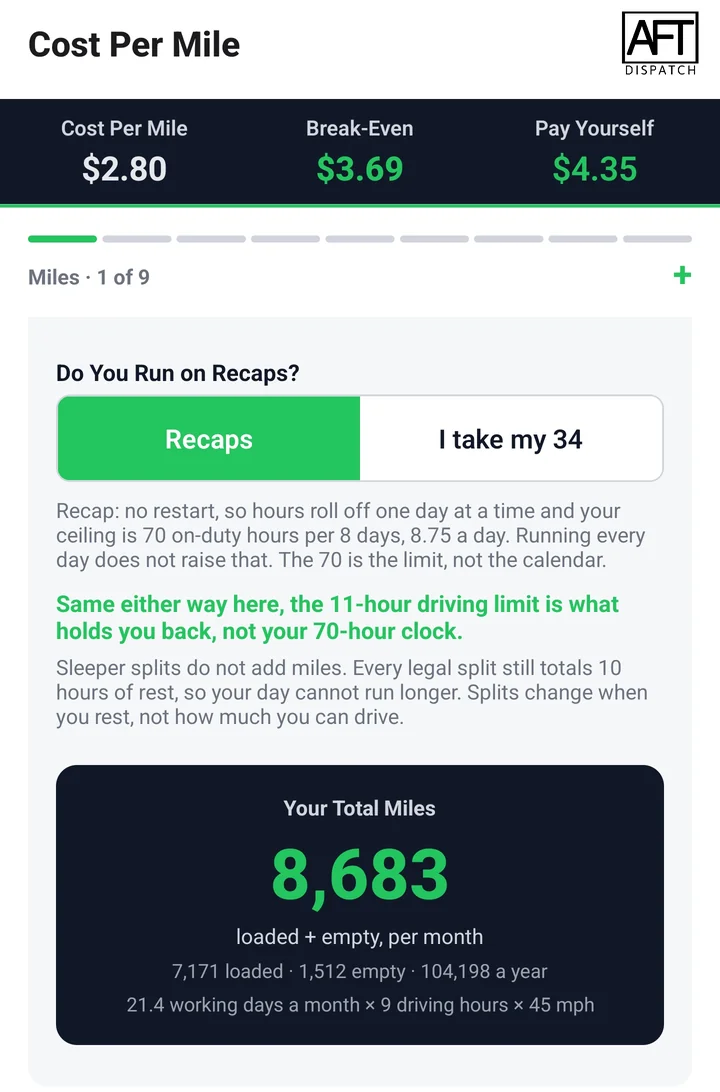
If you know your miles, enter them per week or per month, with loaded and empty miles kept separate. If you don’t, pick “Help me estimate.” The Miles Estimator works out your monthly miles from:
- home-time days a month
- downtime days a month
- driving hours per working day
- average speed
- non-driving on-duty hours per load
- average loaded miles per load
Hours of Service limits are applied to the estimate itself: 11 hours of driving, a 14-hour window and 70 hours in 8 days, all doubled for a team.
A toggle picks recaps or a 34-hour restart. Recaps cap you at 70 hours per 8 days, which works out to 8.75 on-duty hours a day. A 34-hour restart gives 70 hours per 7 days, or 10 a day. The app shows how many miles a month that difference is worth. If you don’t take enough days off for a weekly 34, it falls back to recaps and tells you so.
The Miles Estimator screen shows rates built from the estimated miles, so they can differ from the rates on other screens.
If Your Miles Fall Short
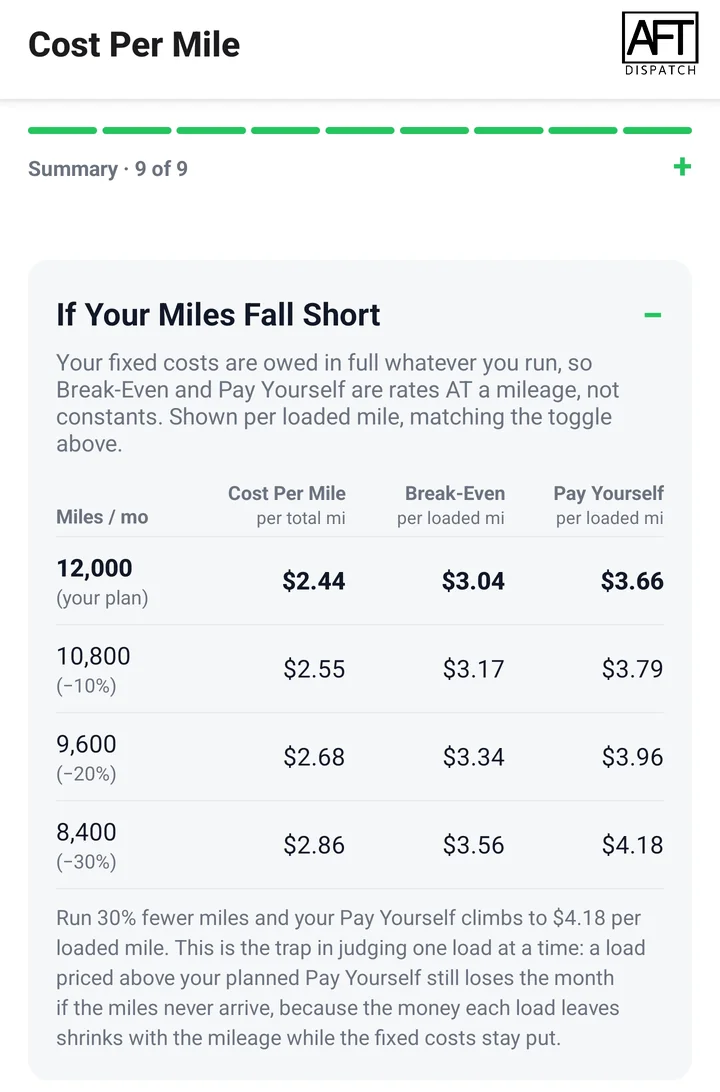
The Summary page has a table that shows your rates at your planned miles, then at 10%, 20% and 30% fewer miles. It carries the same rates as the rate bar: Cost Per Mile, Break-Even, and Pay Yourself when a target pay is set. Each column header names its mile basis on a second line.
At your planned miles, every figure matches the rate bar. Your fixed costs are owed in full whatever you run, so all the rates climb as the miles drop. A note under the table warns that a load priced above your planned Pay Yourself still loses the month if the miles never arrive. Without a target pay, the note uses your Break-Even.
The Real Cost of Getting Paid
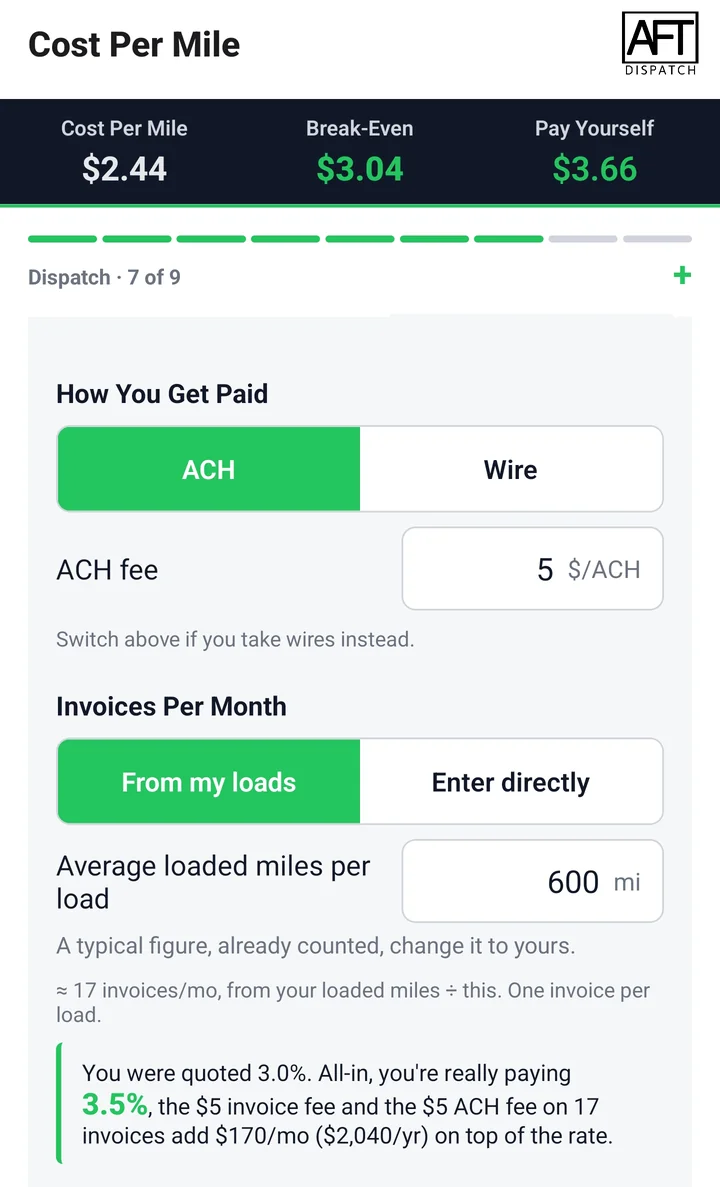
The Dispatch, Factoring & Load Boards page takes dispatch as a percentage of gross or a flat monthly fee. For factoring, you enter the factoring rate, the invoice fee, and either an ACH fee or a wire fee. The app works out invoices per month from your loads, or you can enter the count yourself.
The app counts these fees in 2 places. The percentage fees come off the top, so they go into Break-Even. The invoice fee and the ACH or wire fee are 2 separate fees, each charged per invoice, so they are monthly costs inside Cost Per Mile.
When factoring is on, the app shows your effective factoring rate: the rate you were quoted next to what you are really paying all-in, with the flat fees per month and per year. In Rate Check, each load carries its own invoice fee and ACH or wire fee.
Built Around Real Equipment
- Truck: owned outright, financed or rented. Owned outright adds a replacement reserve. Rented takes the monthly rent, a per-mile charge, and the deposit spread over the months.
- Fuel: dollars per gallon with a single MPG, or separate loaded and empty MPG, or a per-mile fuel figure. DEF has its own line.
- Tires: steer and drive tires, each as cost per set divided by expected mile life.
- Maintenance: either a set-aside repair fund or your actual repair costs, never both, so nothing is counted twice. Add the PM service cost divided by its mile interval, and truck wash.
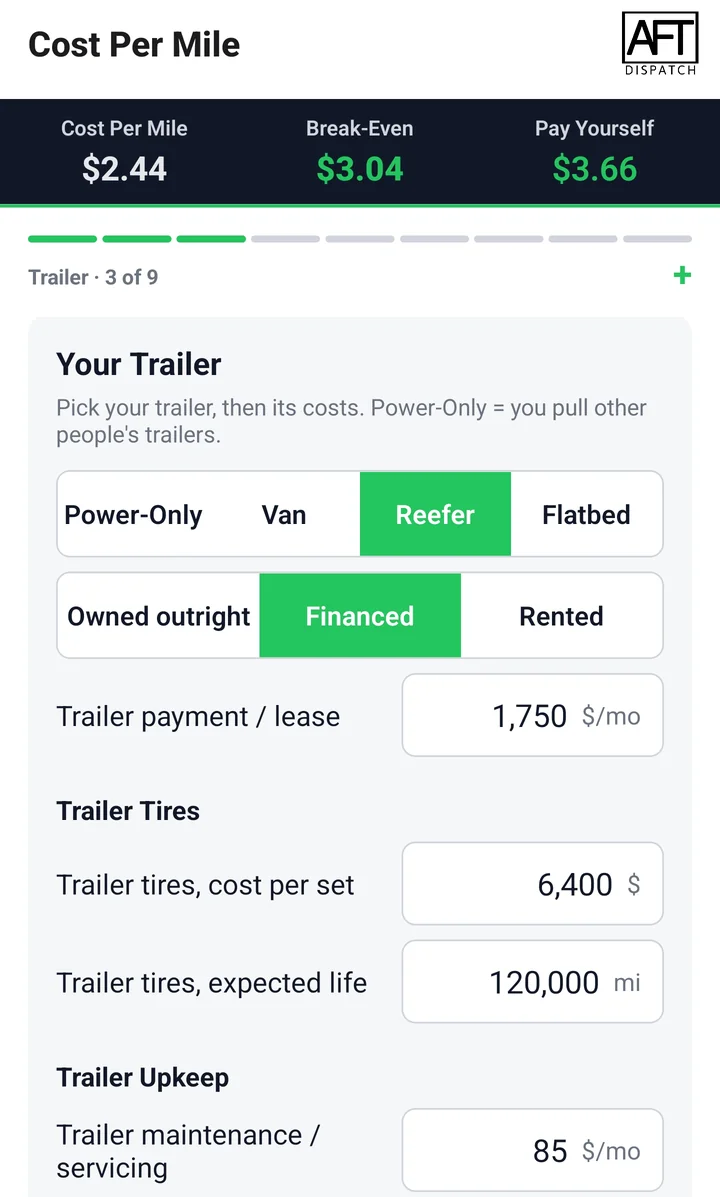
- Trailer: Power-Only, Van, Reefer or Flatbed, owned, financed or rented. A rented trailer adds a mileage charge and a brakes reserve. Reefer adds the unit’s fuel, its maintenance and repairs, and its hours per month times cost per hour. Flatbed adds a securement gear reserve.
- Driver: you drive it, or a hired driver as a 1099 contractor or W2 employee, paid per mile, per month or a percentage of gross (1099 only). For W2, the employer costs are included: FUTA, SUTA, workers’ comp and benefits.
- Insurance: a single all-in line for truck, trailer, cargo and liability, since most owners know their total premium. Separate lines cover occupational accident and workers’ comp for yourself, trailer interchange or non-owned, reefer breakdown and cargo riders.
- Permits, taxes and compliance: IRP plates, the 2290 Heavy Vehicle Use Tax, UCR, IFTA, weight-distance tax for KY, NY, NM, OR and CT, PrePass or a toll transponder, and your ELD subscription.
- Road and admin: paid parking and showers, tolls, scale tickets, lumpers, bookkeeping, tax filing, phone and internet, home parking, owner health insurance and association dues.
- Anything else: “+ Add fixed cost” and “+ Add variable cost” cover any line the app doesn’t list.
Privacy and Cost
Trucking Super Calc is free, with no ads and no in-app purchases. There is no account to create and nothing to sign up for or log into, and the app works fully offline.
The app collects nothing and sends nothing to us. It has no analytics, no crash reporting and no advertising ID. What you enter is saved in your phone’s own storage, so it is there the next time you open the app. Android’s own backup may copy app data to your Google account, as the privacy policy explains. A “Reset all inputs” button clears everything after you confirm.
Read the full Trucking Super Calc privacy policy.
The app runs on Android 7.0 or later and is available in the United States only.
Frequently Asked Questions
Is there an iPhone version?
No. Trucking Super Calc is Android only, and it needs Android 7.0 or later.
Does it tell me what a lane should pay?
No. The app has no lane rates, no market averages and no load board. Every figure comes from what you type in, and Rate Check grades a load only against your own numbers.
Do I need an account or an internet connection?
No. There is no account, sign-up or login, and the app works fully offline.
Are any figures already filled in?
A few. The Miles Estimator settings, like average speed and driving hours, and the employer tax rates for a W2 driver come pre-filled with common figures, and those are counted in your result. Each one carries a note saying so until you type your own number. Every other field starts empty, and a blank cost counts as zero, so enter every cost you pay. Any cost the app doesn’t list can go in a custom fixed or variable line.
Does it work with a hired driver or a team?
Yes. The Driver page handles a hired driver as a 1099 contractor or a W2 employee, with the employer costs included for W2. The Miles Estimator doubles the Hours of Service limits for a team.
Is it available outside the United States?
No. It is listed on Google Play in the United States only.
Get Trucking Super Calc
Trucking Super Calc is free on Google Play. Enter your own costs once, and quote every load from your own numbers.
About Trucking Super Calc
Trucking Super Calc is built by AFT Dispatch, drawing on nearly 15 years in trucking and more than 75,000 loads dispatched. AFT Dispatch publishes trucking education for owner operators and carriers.
Google Play and the Google Play logo are trademarks of Google LLC.